Frequently I am asked by staff why their wifi is slow? Often they will have 50mbs broadband and a new high-speed wifi router but still find that their connection speed to non-cabled devices is slow
I have high-speed broadband [or fibre] and yet I am still not getting the full speed. Why is it so slow?
The easiest analogy to use is that of a pub/bar… If the room contains only two people, it is very easy to communicate. The more people that are in the room, the harder it is to get your message across.
WiFi works much the same way, the more devices you have the more time they spend trying to get a word in on the conversation. Add to this that the frequencies (rooms, if you like) also collide and overlap. So just because you are in one room of the pub, you still get noise from next-door which interrupts your conversation.
It is possible that not only are the frequencies used for wifi crowded and overlapping with others’ but also that the channel you are using is also being used by someone else!
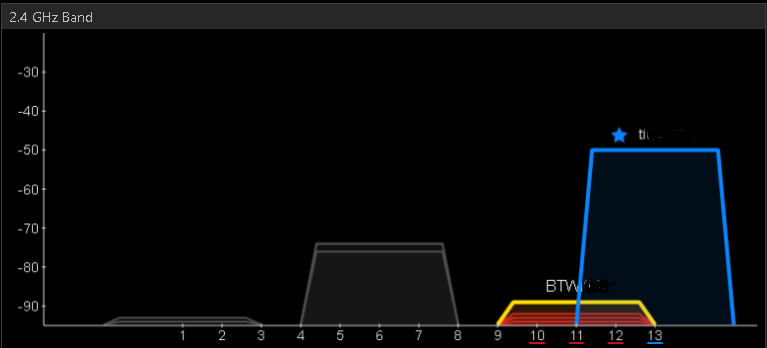
As you can see in the above image, the “ti” SSID (wifi) is overlapping with the “BTW” SSID. This means that communication may be degraded. In this case BTW is quite far away (low signal) and unlikely to cause too much problem, but you may have a worse situtation.
Ideally you want to see none of the SSIDs overlapping. You can check your wifi using “inSSIDer free edition” from here.
There are different standards of of WiFi that can be used, such as A,B,G,N which operate on different frequencies and at different speeds (shown below). Generally, older standards have lower bandwidth, however in a busy environment it can be beneficial to drop to a lower standard if the newer ones are more crowded. (Getting a quarter of the bandwidth on a new standard may be slower than getting full bandwidth on an older standard. It will vary with each environment.)
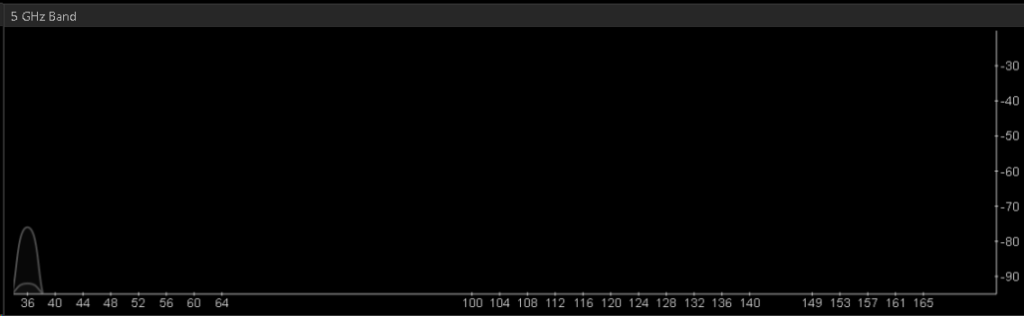
Where I live there are only a few competing SSIDs, but if i switch to the newer, less popular [so far] 5ghz channels I find no-one else is using it!
This sounds like a wonderful solution, more bandwidth AND no competitors!… but not all of my devices support 5ghz, so I have to run both.
| Standard | Frequency | Bandwidth |
| 802.11a (A) | 5GHz | <=54Mbps |
| 802.11b (B) | 2.4GHz | <=11Mbps |
| 802.11g (G) | 2.5GHz | <=54Mbps |
| 802.11n (N) | 2.4GHz | <=600Mbps |
The above table shows the bandwidth per wifi type, but you need to consider your device capabilities when selecting one. Not all devices support all standards.
I have experienced environments where using A is faster that using G, despite G being the newer standard. Mainly because A is on a different frequency range and no one else was using it.
If you are having WiFi speed issues, consider:
- Reducing the number of devices on your SSID
- Use inSSIDer to check the neighbouring SSIDs and channel overlap (change the channel on your wifi hub if it collides)
- Use a cabled connection wherever/whenever possible
Something worth remembering is that if you have a NAS (Network Attached Storage) unit and a laptop, both capable of 1Gbps networking on the cabled ethernet port you will not get that speed over wifi… in fact it could be considerably worse depending on your environment. A recent test on my WLAN/LAN showed that a large transfer over WiFi would take 2hours complete, the same transfer via cabled connection was 14minutes!
Also, don’t assume that your “automatic” setting for channel on the hub will select the best channel. In my experience the auto-selection process is very bad on most ISP/Telco provided routers. My BT one used to always choose the same channel as my neighbour’s SkyTV router! Things soon improved once I forced the channel to something non-overlapping.